Registry部署
程小虎2025-12-28 10:46:42
📦 Registry部署
📌 文档信息
- 作者: 程小虎
- 创建时间: 2025-12-29
- 最近修订: 2025-12-29
- 版本号: v1.0
✨ 介绍
- 本教程基于Docker部署Registry
- 本教程使用脚本安装,可实现一键安装,整个安装过程只需要一条命令即可
- 默认安装的Gitlab版本为 3.0.0
- Registry 可用作轻量级 私有镜像仓库,相较于 Harbor 占用资源更少
🛠️ 安装过程
安装过程中需要使用root用户进行安装,若系统当前用户为非root用户(必须是配置了sudo免密),则先执行下面命令切换为root用户
sudo su - root
执行下面命令,创建文件上传目录
mkdir /soft
将Docker安装包对应的文件夹 [ ],上传至/soft 路径下,若一开始登录的时非root用户,可以先上传到 /tmp 路径下,然后移动到 /soft 下
- registry-3.0.0.tar:Registry离线镜像包
- install_registry.sh:一键安装脚本
[root@huge ~]# cd /soft/Registry
[root@huge Registry]# ll
总用量 56916
-rw-r--r--. 1 root root     6057 12月 29 18:25 install_registry.sh
-rw-r--r--. 1 root root 58273792 12月 29 18:25 registry-3.0.0.tar
直接执行脚本即可安装
[root@huge Registry]# bash install_registry.sh

导入离线镜像 [ registry-3.0.0.tar ]

运行容器

恭喜!Registry部署成功。请按照如下操作修改配置文件后重启Docker生效:

====================================
    请在 /etc/docker/daemon.json 中配置如下内容:

      "insecure-registries":["192.168.80.12:5000"]

    重启Docker命令:systemctl daemon-reload && systemctl restart docker
====================================
📄 修改daemon.json
执行下面命令,修改 daemon.json 文件,将私有仓库地址添加到配置文件中
[root@huge Registry]# vim /etc/docker/daemon.json
添加后内容如下:
{
    "registry-mirrors": [
        "https://docker.1ms.run"
    ],
    "insecure-registries": [
        "192.168.80.12:80",
        "192.168.80.12:5000"
    ]
}
重启Docker
[root@huge Registry]# systemctl daemon-reload && systemctl restart docker
✅ 测试仓库
我们拉取一个测试镜像,修改tag后,推送到刚刚部署的私有镜像仓库
[root@huge Registry]# docker pull hello-world
Using default tag: latest
latest: Pulling from library/hello-world
17eec7bbc9d7: Pull complete
Digest: sha256:d4aaab6242e0cace87e2ec17a2ed3d779d18fbfd03042ea58f2995626396a274
Status: Downloaded newer image for hello-world:latest
docker.io/library/hello-world:latest

[root@huge Registry]# docker tag hello-world 192.168.80.12:5000/hello-world:latest

[root@huge Registry]# docker push 192.168.80.12:5000/hello-world:latest
The push refers to repository [192.168.80.12:5000/hello-world]
53d204b3dc5d: Pushed
latest: digest: sha256:19459a6bbefb63f83f137f08c1df645f8846e2cd1f44fe209294ebc505e6495e size: 524
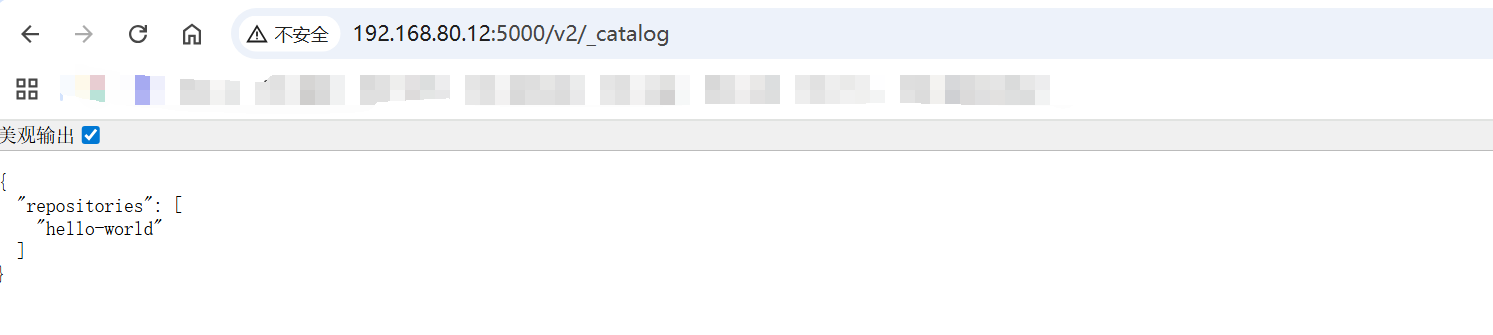
可以打开浏览器,访问如下地址,查看仓库中的镜像
http://192.168.80.12:5000/v2/_catalog